One place for the messages and work that matter today.
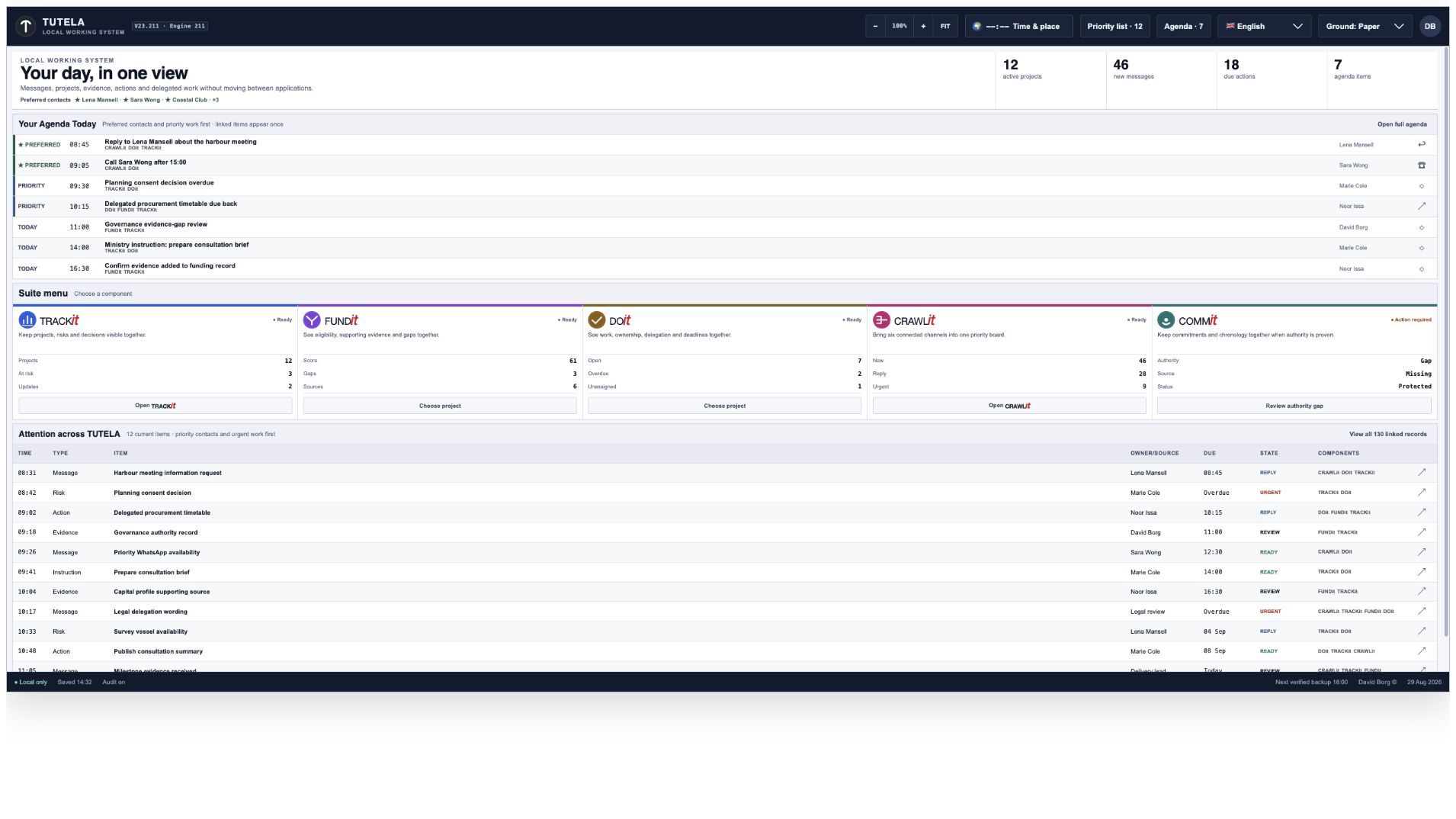
Engine 211 opens on a daily overview. From there, the CRAWLit logo opens the private communications workspace.
Demonstration dataThe entry dashboard. Agenda, component status and linked work appear before the owner opens the unified inbox.
Top bar
Change the size, time zone, language and colours, or open today’s priorities and agenda.
Left menu
Move between messages, contacts, notes, calls, alerts and settings without losing your place.
Main workspace
The selected board or list opens here, while the main controls stay in view.
Bottom status bar
See whether your information is local, when it was saved and when the next backup is due.
02 · Unified board
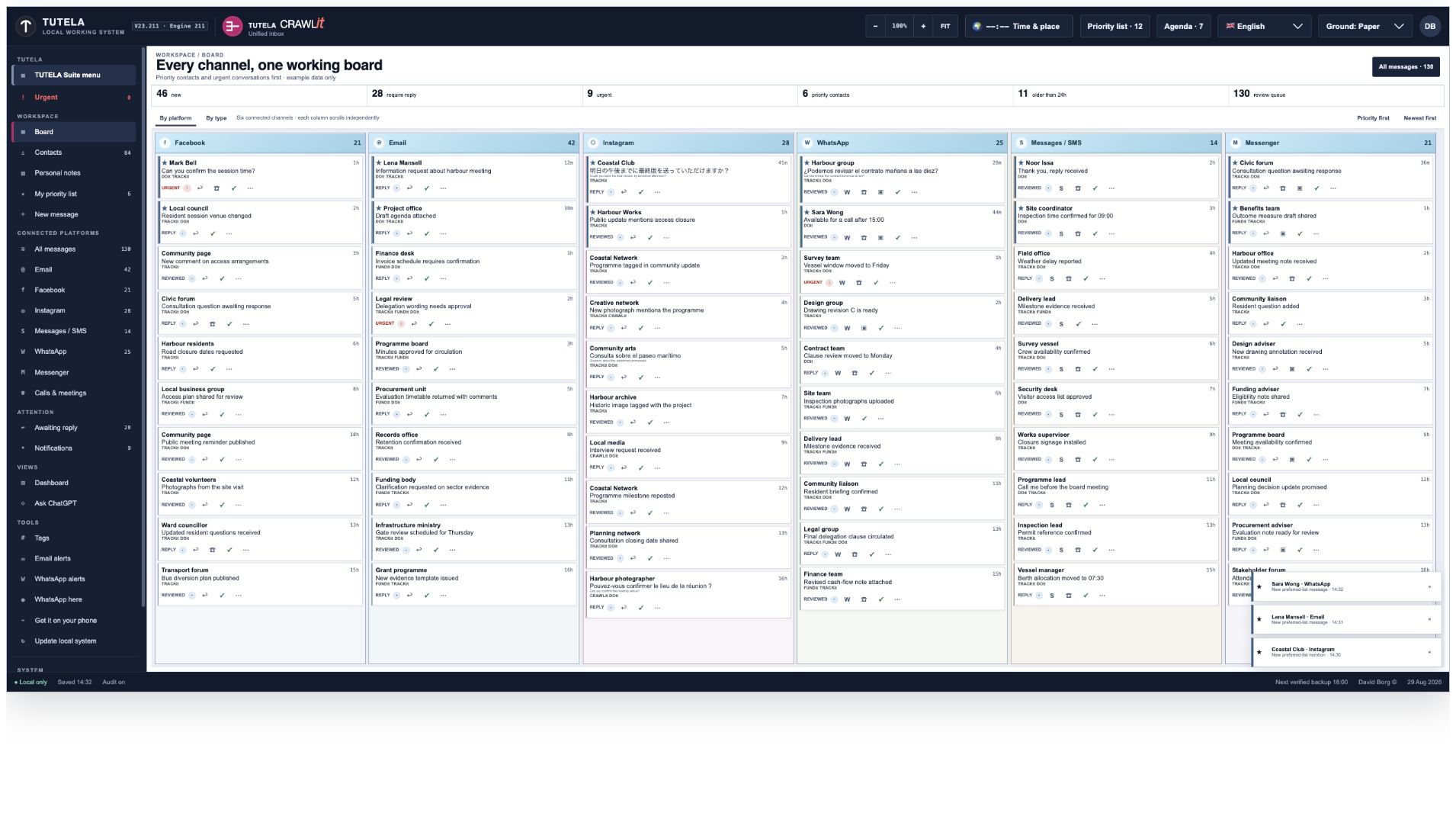
See six message services side by side.
Facebook, email, Instagram, WhatsApp, Messages/SMS and Messenger each have their own column. Scroll one column without moving the others.
Demonstration dataThe complete board. Each column reports its own item count; the summary strip reports new, reply, urgent, priority and age totals.
▥Separate columns
You can always see which service a message came from.
Example: open WhatsApp without hiding your place in email.●Honest connection status
Each service says whether it is connected, saved locally, waiting for permission or must open in its official app.
You are never told that something works when it does not.↕Scroll each service separately
Read older email while WhatsApp stays on its newest conversation.
Long lists load a manageable amount at a time.⌕Show only what you need
View everything, one service, or only messages that still need a reply.
The same familiar controls remain available.
03 · Message cards
Each message shows who sent it, what it says and what you can do next.
The original message, translation, priority, status and available actions stay together in one clear card.
Demonstration dataA closer, useful view. Real Engine 211 message cards are enlarged so the sender, message, status and actions can be examined without a sea of empty space.
1 · Who and when
See the sender or group and how long ago the message arrived.
2 · Original message
The sender’s own words always remain visible. A translation appears separately.
3 · What needs attention
Labels such as Reply or Urgent explain why the message is still on your board.
4 · Useful actions
Reply, call, mark Done, archive or flag as urgent—only when that action is available.
5 · Conversation history
Email, WhatsApp and SMS replies can remain grouped beneath the first message.
Worked example: “Can we review the contract tomorrow at ten?” remains in Spanish, receives an English translation below it, carries TRACKit/DOit references, and offers WhatsApp, call, video, Done and more actions.
04 · Priority people
Put important people ahead of a busy inbox.
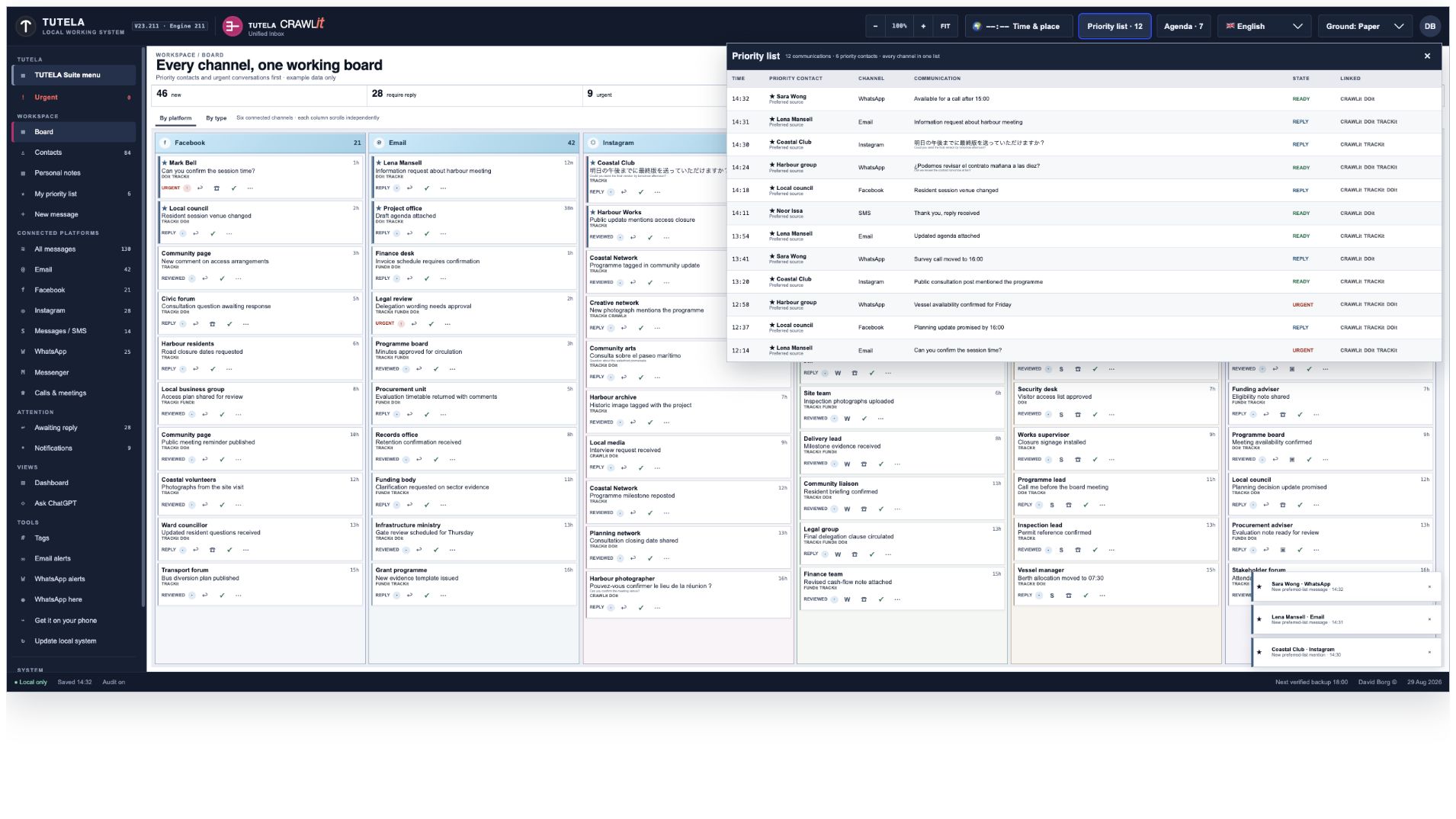
Mark a person or group as important and see their recent messages together, whichever service they used.
Demonstration dataPriority list. Six selected contacts produce one cross-channel list of twelve communications.
Mark a message as urgent and it appears immediately in the Urgent list. Remove the mark when the pressure has passed.
!Escalate
Press the item’s urgent control. It enters the dedicated list and sorts ahead where priority sorting is active.
Example: a vessel-window change blocks Friday’s milestone.✓Resolve
De-escalate when urgency passes, or press Done when the communication is completed.
Result: urgency remains a deliberate, reversible instruction.↕Group the list
View urgent work in native order, by day, person/group, importance or type.
Example: group by person before returning calls.⌂Keep it local
The manual urgent selection is stored as a local device preference.
No remote service receives the list.
06 · Agenda
Turn important messages into today’s short action list.
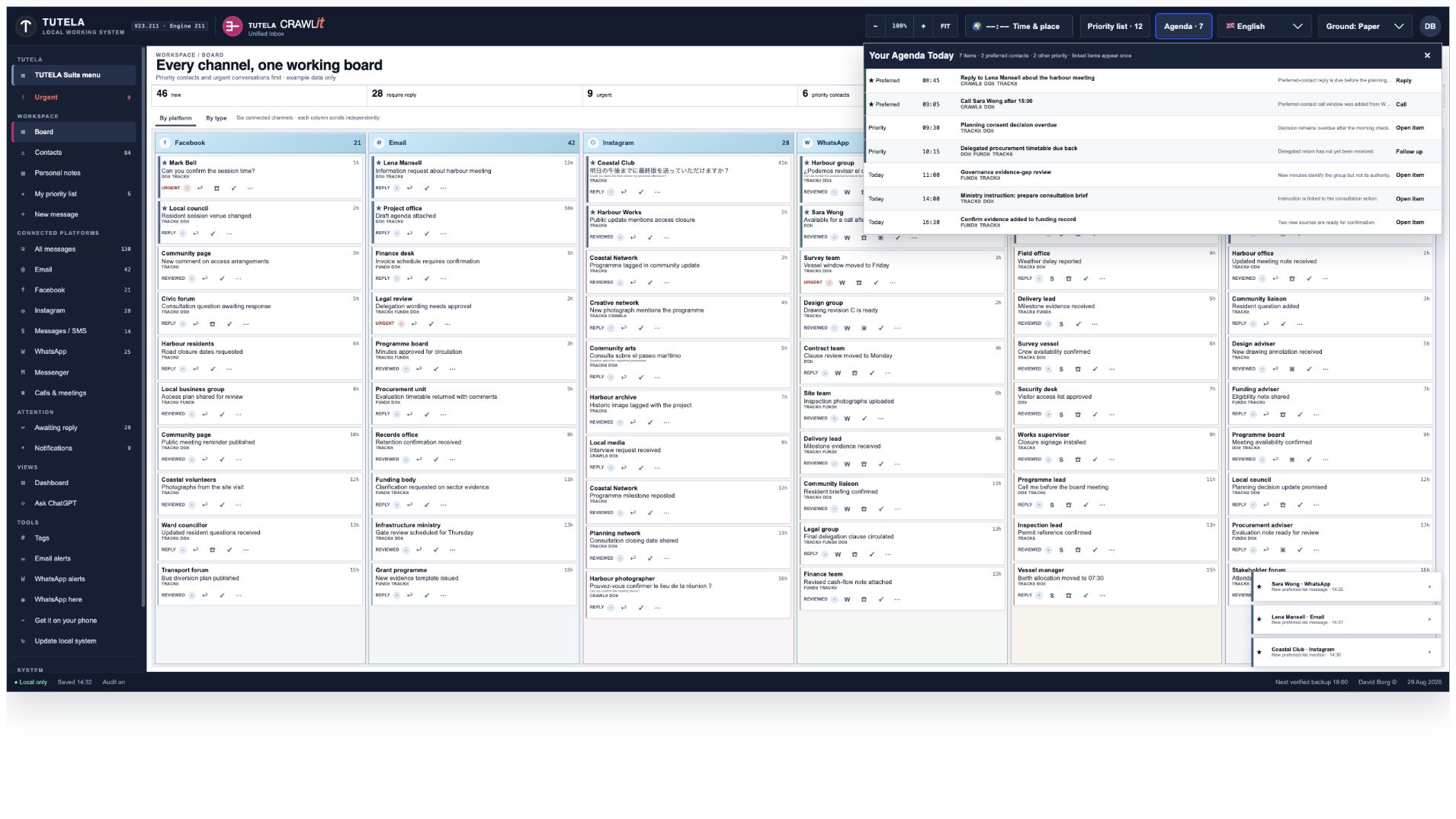
The Agenda brings together replies, calls and follow-ups that need attention today, with a link back to the original message.
Demonstration dataToday’s agenda. Reply, call, follow-up and open-item actions remain visibly attached to the communication that caused them.
Worked example: Lena Mansell’s harbour-meeting email is due at 08:45, marked Preferred, linked to CRAWLit, DOit and TRACKit, and exposes Reply as its next action.
07 · Contacts, conversations and messages
Find a person first, then use the services that really work for that person.
Search all contacts together or search within one service. If a service is unavailable, you are told clearly.
♙Contacts
Source-labelled people and groups, with counts, per-source search and a global search field.
Example: find “Lena” across email and stored conversation material.★Priority marking
Promote or remove a contact from the owner’s priority set.
Result: their recent active communication is raised throughout the interface.+New message
Select a real contact, add a subject for email if required, write the message and use an authorised route.
The draft remains local until Send.↩Reply
Replies use the selected official service; where CRAWLit lacks authority, it offers the official app.
No dead composer is presented as functional.×Remove and restore
Remove hides a contact from active selection; the removed-contact list supports restoration.
Useful for obsolete numbers without destroying local history.▧Personal notes
Private title-and-body notes are saved and removed through the local Engine 211 store.
Example: retain call context that should not be sent to any platform.
08 · Organise and find
Sort the same messages in the way that helps you now.
Change the order or group without creating extra copies of the messages.
Group a busy WhatsApp source by person before answering.
Attention groupingNative · Day · Person/group · Importance · Type
Turn Agenda into a call list grouped by contact.
Awaiting ReplyAll connectors reporting a reply route
See work that can be answered now.
NotificationsRecent local items · return to source
Open the corresponding platform column from a notification.
TagsComma-separated watch words
Watch “permit, funding deadline, vessel” locally.
NamesComma-separated watched names
Keep a small local watchlist without exporting contacts.
Long-list loading80-record batches
Keep a 9,000-record local history usable without drawing every card at once.
09 · Language, translation and display
Read everything your way.
Choose how Engine 211 looks, reads and handles translation without changing the sender’s message.
🌐Choose the interface language
Change the menus and controls between English, Italian, Spanish, French, Chinese, Japanese, Portuguese for Portugal, Portuguese for Brazil and Arabic.
Your choice applies to the application, not to the sender’s words.文Keep the original message
The sender’s exact message remains visible. Any translation appears beneath it as a separate reading aid.
You can always compare the translation with what was actually written.↔Read from the correct direction
Arabic uses a right-to-left layout. Other languages keep their normal left-to-right layout.
Names, times and actions remain clear in either direction.◉Control private translation
When your computer can translate locally, Engine 211 can offer that option without sending the message to TUTELA.
You decide whether a translation is requested.◐Choose a comfortable display
Switch the reading ground and contrast to suit daylight, evening use or easier reading.
The content does not change when the colours change.⏱Set your country and time zone
Dates and times are presented in the setting you choose, so an arrival or deadline makes sense where you are.
Engine 211 keeps the underlying record intact.
10 · Calls, meetings and assistants
When another app must make the call, the official app opens.
You can start from one place, while phone calls, WhatsApp, Teams and ChatGPT continue in their own official services.
☎Phone / FaceTime
Enter a number and open the Mac/iPhone phone or FaceTime Audio hand-off.
CRAWLit does not intercept or answer a personal call.WWhatsApp
Open the official WhatsApp contact for messaging or calling when a usable number exists.
Video remains in the official application.TTeams meetings
Validate a real teams.microsoft.com or teams.live.com link, then open it in a separate TUTELA child window.
Invalid hosts are rejected.◇Ask ChatGPT
Open official ChatGPT in a separate window.
No contacts or messages are transferred; only what the owner types there goes to OpenAI.
11 · Phone and second-device pairing
Open your private workspace on your phone with a temporary QR code.
The phone connects to the same Engine 211 workspace. It does not make another copy of your message history.
Example onlyYour real QR code is created by your own Engine 211 and expires after ten minutes.
1
Choose “Get it on your phone”
Engine 211 prepares a private link for this computer.
2
Check the secure connection
The screen confirms whether the local link or protected tunnel is ready.
3
Scan the QR within ten minutes
The code contains no password and stops working when its time runs out.
Your information stays on your computer.
The QR opens the existing workspace on an approved phone. It does not send your private message database to TUTELA or create a second cloud copy.
12 · Connections and alerts
See which services are connected and what each one can do.
For every service, Engine 211 tells you whether it can read messages, send replies, show saved history only, or still needs permission.
ServiceWhat is checkedWhat you can do
EmailYour incoming and outgoing email settings
Read your saved email and send replies through your own account.
Facebook and InstagramWhether the approved connection or browser helper is working
See new messages when connected, or continue reading the history already saved on your computer.
WhatsAppWhether your local session or approved business connection is linked
See messages, open the official app and send alerts if you chose to set them up.
Messages / SMSWhether macOS has given permission
Read local history and open your phone or Messages app to continue.
MessengerWhether a connection or saved local history is available
View available messages and open Messenger when an official action is needed.
AlertsWhere alerts should go and whether the last test arrived
Send a test and see a clear success or failure result.
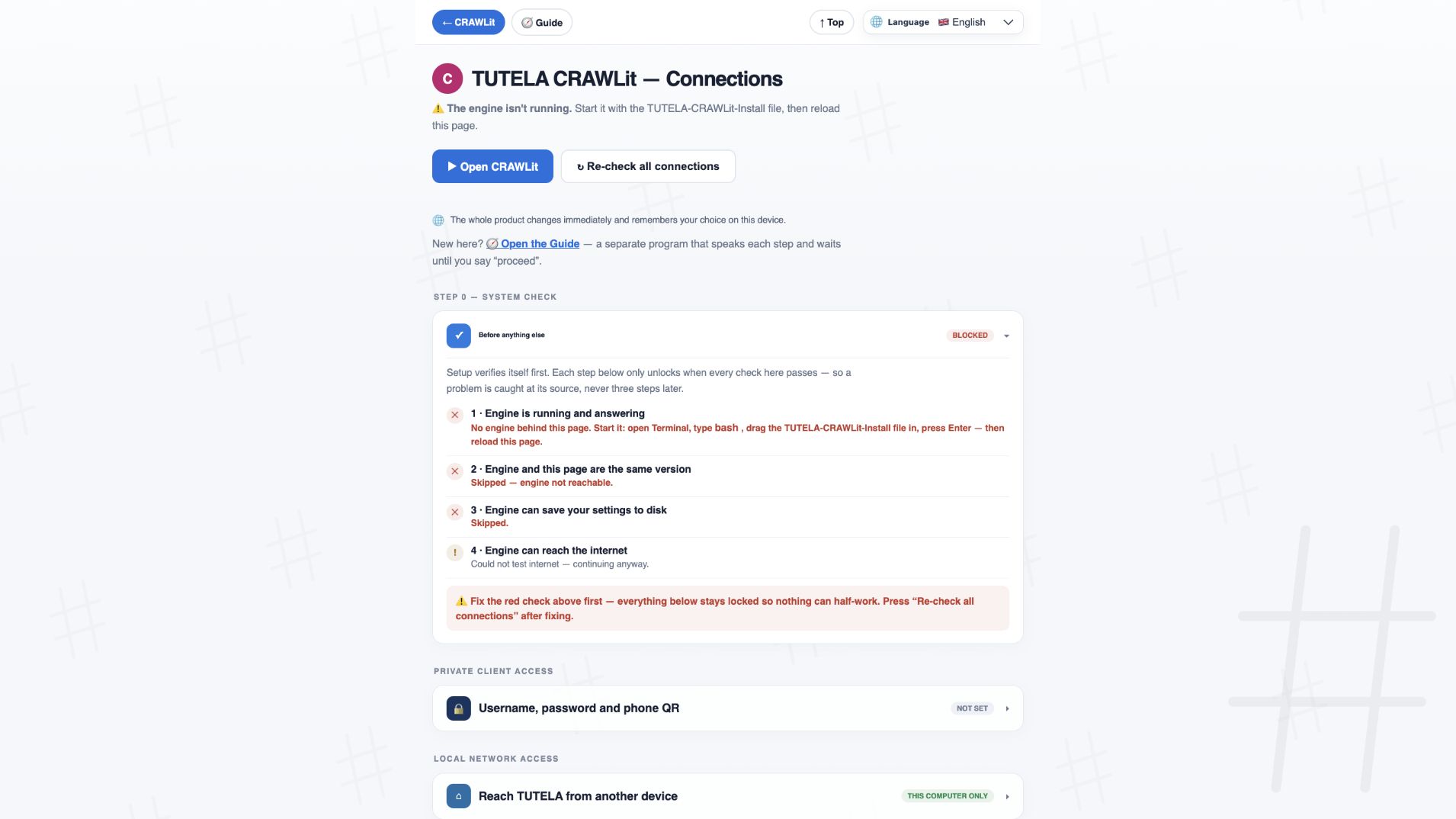
13 · Guided setup
The setup checks each step before it moves on.
If the engine is not running, the versions do not match, or settings cannot be saved, later steps remain locked and the reason is shown.
Isolated demonstrationThe real Connections page in isolated demonstration mode. The red prerequisite explains precisely why later steps are locked.
1 Engine answers2 Build matches3 Settings are writable4 Internet is reachable
Human intervention is the exception. The guide pauses for account creation/billing, identity or two-factor verification, passwords, legal consent or operating-system approval. Voice and text identify the complete navigation path; automation resumes afterwards.
14 · Protection, backup and recovery
Your private information stays local—and you can recover it if something goes wrong.
Engine 211 encrypts the local database, keeps the key separately, checks every backup and asks for clear confirmation before replacing anything.
◆Encrypted on your Mac
Your local database is locked with strong encryption. Its key is kept separately in macOS Keychain.
Your personal message store remains on your computer.✓A backup you can check
Every backup shows when it was made, how many files it contains and a digital fingerprint that reveals any change.
You can check the copy before relying on it.⌘A separate recovery key
Save the recovery key somewhere safe or load it when moving to another Mac.
The key is not stored beside the backup it unlocks.⌕Check before restoring
Engine 211 inspects the backup first and gives you ten minutes to complete the restore.
A file is never trusted only because its name looks right.!Clear warning before replacement
You must confirm that current information will be replaced and type the exact restore sentence.
A safety copy is created before anything is replaced.↻Safe application updates
The update screen shows your current build, the available build and whether your information will be preserved.
The application changes; your message history does not.
15 · Privacy boundary
Your private messages do not go to TUTELA.
Only a work item that you deliberately choose and approve can leave your computer.
ON YOUR COMPUTERYour private information stays here
Messages, contacts, notes, translations, passwords, access keys and your complete local history.
PRIVATE DATASTOP
It cannot cross this boundary.
YOUR CHOICEYou select one work item
You see exactly what will be shared. Nothing moves until you approve it.
ExampleAction: Reply to planning requestProject: Harbour meeting · Due: Friday
ONLY AFTER YOUR APPROVAL→
CUSTOMER-OWNED CLOUDTUTELA receives only the approved work details
The private message, conversation history and login information remain on your computer.
16 · Complete command directory
Find any feature and see what it does.
Search for words such as “backup”, “WhatsApp”, “priority”, “translation” or “archive”. Every result is taken from Engine 211.
60verified Engine 211 functions shown
The nine Engine 211 languages
One pencil. Nine ways to say hello.
These are the exact nine languages offered by the actual CRAWLit application.